

Nearly all nonprofit arts and culture organizations run on a season, not a calendar year. Your board measures success from September to August. Your development team reports donations against a fiscal cycle that has nothing to do with January 1. Your box office manager wants to know how ticket sales are trending this season, not this year.
So why does your ticketing CRM still think the year ends on December 31? 🗓️
Most CRM platforms are built for general commerce. A calendar year is the default because it works for retailers, restaurants, and software companies. It does not work for a symphony that opens in October and closes in May, or a theater company whose fiscal year runs July through June. When your reporting tools are locked to the wrong time frame, every dashboard, every sales summary, and every data export requires a manual workaround just to reflect your actual operating reality.
That is not a minor inconvenience. It is friction baked into every decision you make.
Seasons As A First-Class Feature
UpStage’s new Season Pattern Management system eliminates that friction entirely. You define your season once: a start month and day, and the system handles everything else. It automatically generates season labels across your entire transaction history, forward and backward, using the standardized format your team already uses. A September 1 start date produces “2024-25 Season,” “2023-24 Season,” and so on, all the way back to your earliest recorded transaction.
No imports. No manual date ranges. No reconfiguring reports every time a new season begins. 🎊
The system generates a new season automatically on the end date of the current one, so your reporting stays current without any administrative intervention.
Built Into the Tools You Use Every Day
The new Season context is embedded throughout the platform to make the day-to-day tasks for admin easier:
- Box Office Dashboard: Product selectors across Event Sales, Ticket Packages, and the Season Overview tab now defaults to the current season, giving your team an accurate picture the moment they log in.
- Reports: When building custom reports for purchased event tickets or ticket packages, your season is available as a filtering dimension without any extra configuration.
- Vouchers and Purchase Discounts: When restricting usage to specific events, the event selector now uses an autocomplete component organized by season, making it dramatically faster to find what you need.
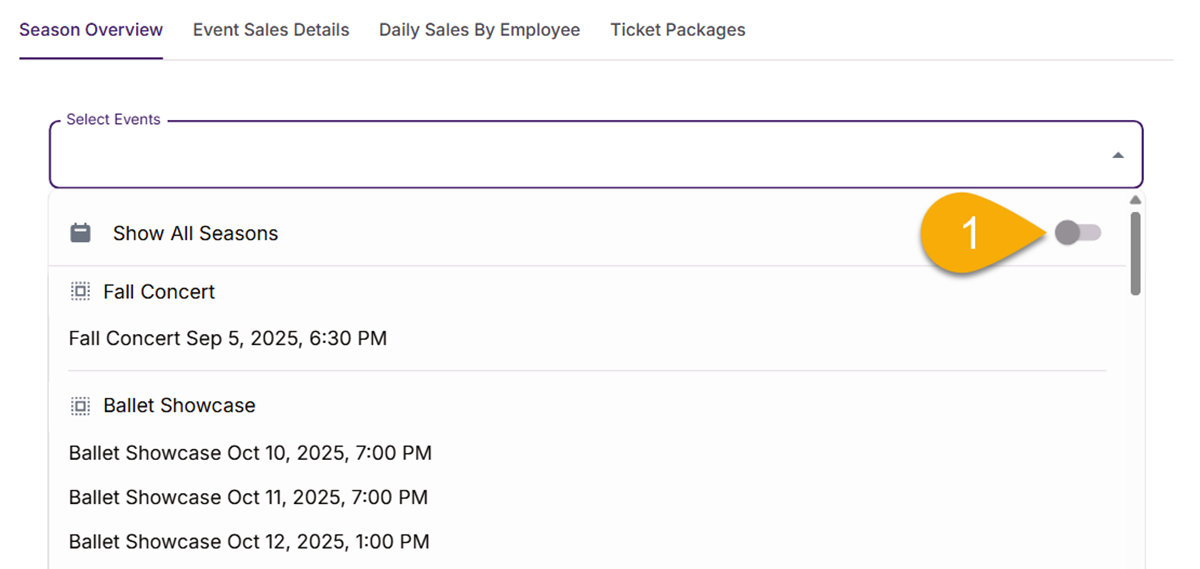
The calendar year selector you use elsewhere in the platform remains unchanged. Seasons are a separate, configurable layer, designed specifically for the way arts organizations actually operate.
The Difference Specialization Makes
Generic CRM platforms will never prioritize this. Their product roadmaps answer to a much broader customer base, and performing arts fiscal cycles are not on their radar. A feature like Season Pattern Management exists in UpStage because we built this platform specifically for nonprofit arts and culture organizations, and we stay close enough to how you work to know that “what year is it?” has a different answer in your world than it does everywhere else.
Your season is the unit of measure that matters. Your CRM should know that.