


General admission events now show patrons a short availability message, like “Tickets available” or “Almost sold out.” You write the messages. UpStage handles the math.
We realize “CRM Added Four Labels” isn’t the most cinematic hook. Stay with us. It gets better.
What Patrons See Now
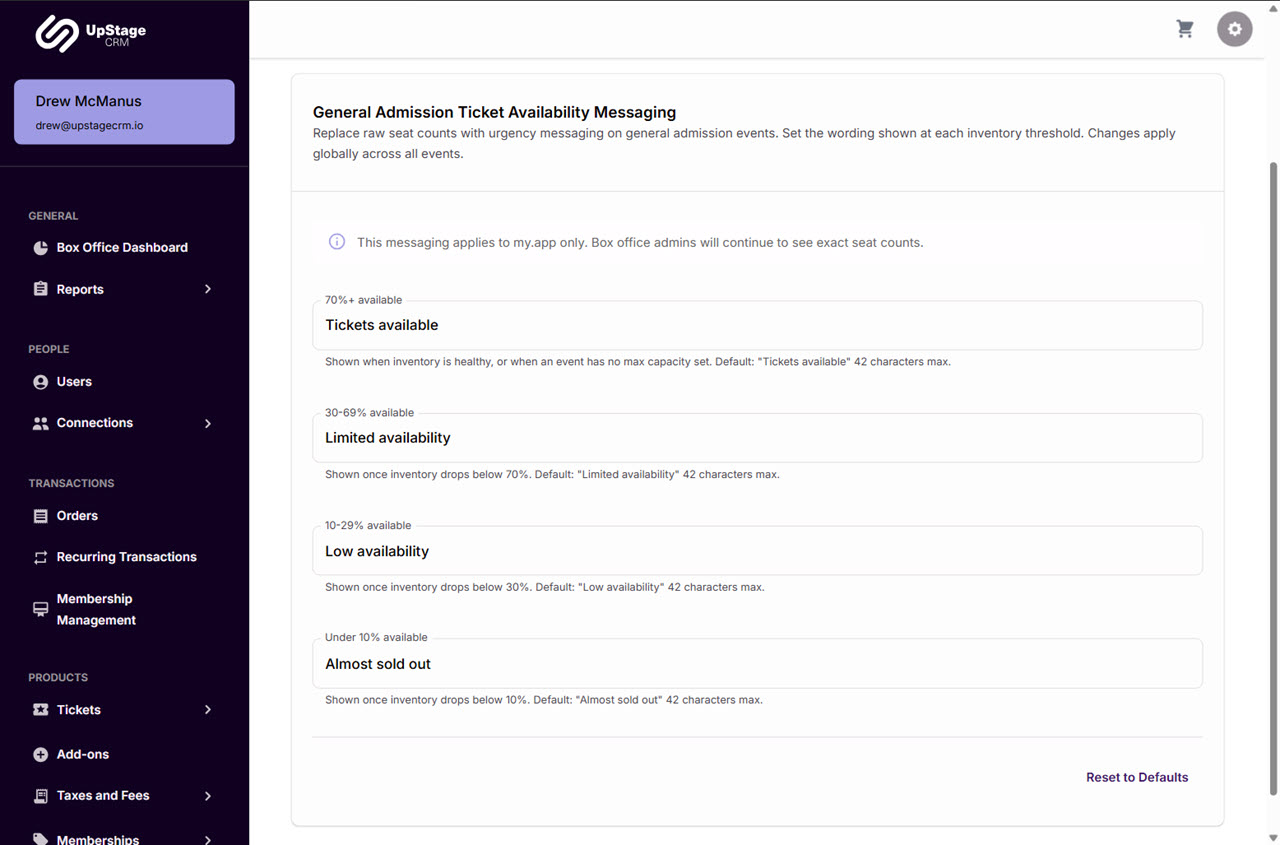
Each general admission event displays one of four messages, based on the percentage of tickets still available:
- 70% or more available: “Tickets available”
- 30 to 69% available: “Limited availability”
- 10 to 29% available: “Low availability”
- Under 10% available: “Almost sold out”
Those are the defaults. Keep them, change them, frame them. Your call. We won’t take it personally.
Here’s where the math kicks in to save you time:
- Messages update on their own as tickets sell. No babysitting required.
- Events with no max capacity set show your 70% or more message. Unlimited tickets, unlimited optimism.
- The percentage is based on tickets available to All Users and Select Users, compared to the event’s max capacity. Yes, there’s math. No, you don’t have to do it.
Who Still Sees The Real Numbers
Admins and Box Office Managers still see actual ticket quantities in the Boxoffice App. Your team gets the details. Your patrons get the narrative.
Make The Messages Sound Like You
Somewhere in your organization is a person with strong opinions about the word “limited.” If that’s you, you’re gonna love this part.
Head to the new Ticket Availability tab in CRM > Admin Tools > Global Settings. Here’s what’s waiting:
- Four text fields, one for each availability level, filled in with the default messages
- Helper text under each field explaining when that message appears
- A 42 character limit per message, with an error if you go over
- A Reset to Defaults button, in case inspiration takes a wrong turn
- An Update Ticket Availability button to save your changes
- A warning if you try to leave the page with unsaved changes
Your messages apply to every general admission event. Write them once. Admire them indefinitely.
Each message tops out at 42 characters. Enough for urgency. Not enough for a monologue. Less is the new more.
See It On Your Own Events
Want to see how availability messaging can look with your events and your brand voice? Book a personalized demo. We’ll keep the pitch short. Not 42 characters short, but close.




