


Somewhere in your CRM, a patron has been a member since a season so old the coffee cups on your desk hadn’t been invented yet. Good for them. Bad for you, because until now, that entire history lived in your head, a spreadsheet, or nowhere at all.
Not anymore.
What’s New
Two updates just landed on the patron record dashboard, both aimed at the same problem: giving your team a complete, at-a-glance picture of a patron’s membership status without digging through transactions.
The Membership History Card
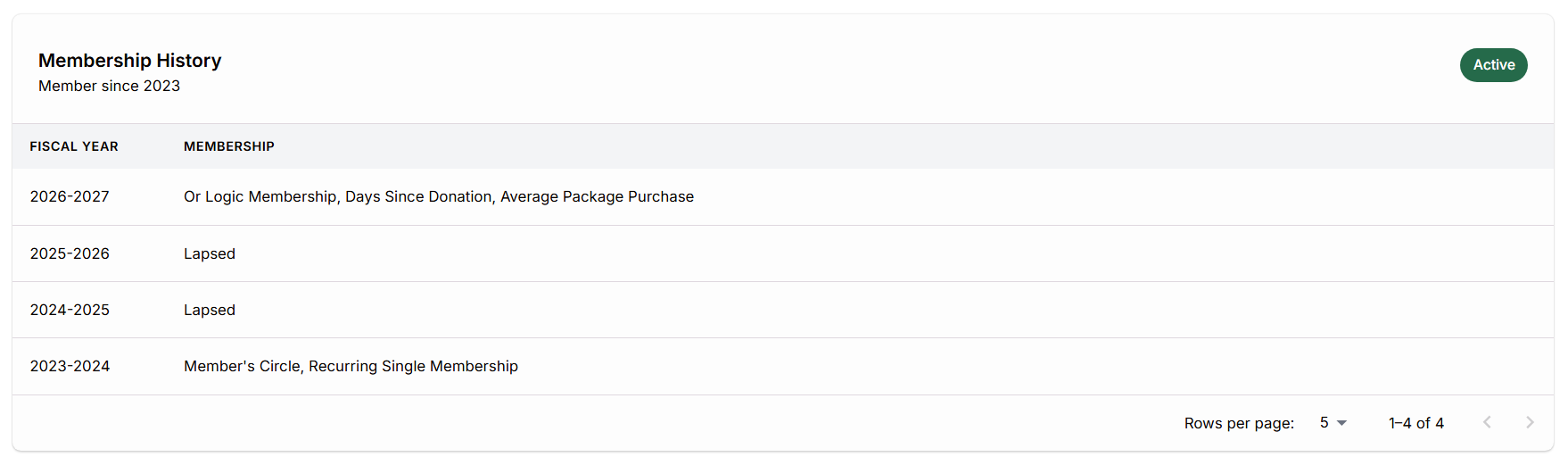
This is a new card on the patron record, and it only shows up when it has something to say. No membership history, no card. Simple.
When a patron does have history, the card leads with a header showing “Membership History,” a “Member since [season]” subtext pulled from their first membership transaction, and a status chip in the top right: Active if they’re a member this season, Lapsed if they held a membership before but let it go.
Below that, a table lays out every season from their first membership to the current one, no gaps. Two columns: Season and Membership. Seasons where they held a membership show the product name. Seasons where they didn’t show “Lapsed.” The table paginates at five rows by default, and on smaller screens, it scrolls horizontally instead of squishing itself into something unreadable.
Next Steps
Want to see how this fits into your workflow? Book a personalized demo and we’ll walk through it together.




