


Most nonprofit arts and culture organizations don’t run on a January through December calendar. They might kick off with opening night in September, or the first ticket sale in July, or some fiscal quirk your board locked in years ago that nobody’s touched since. UpStage now lets you define that pattern once, and it handles the rest.
What Season Pattern Management Does
You set a start date, and an end date gets calculated automatically based on it. From there, UpStage generates a full run of seasons using that pattern, labeled consistently in a clean 2023-24 format, applied across your entire transaction history.
How Seasons Get Generated
Once your pattern is set, UpStage builds seasons in both directions:
- Backward, all the way to your organization’s earliest recorded transaction
- Forward, through the end of next year
- A new season is created automatically the moment the current one ends
Every transaction belongs to exactly one season. No gaps, no overlaps, no dates left to fend for themselves.
How Your Current Season Is Calculated
If your season start date falls in the past or lands on today, your current season runs from that date through one day before that same date the following year. If the start date is set in the future, your current season covers the year leading up to it, ending one day before that start date arrives.
Default Settings
If you don’t touch anything, you’re not left with a blank page. The default label simply reads “Season,” and the default date range runs January 1 through December 31, the same calendar year setup you’re probably already used to.
This Doesn’t Replace Your Calendar Date Range
The standard date range selector you already use throughout the site isn’t going anywhere. Season is a separate, configurable annual range built specifically for reports, widgets, and other data tools, so you can analyze activity on a fiscal year, or any custom year, independent of the standard calendar.
Powers Your “Show All Seasons” Selector
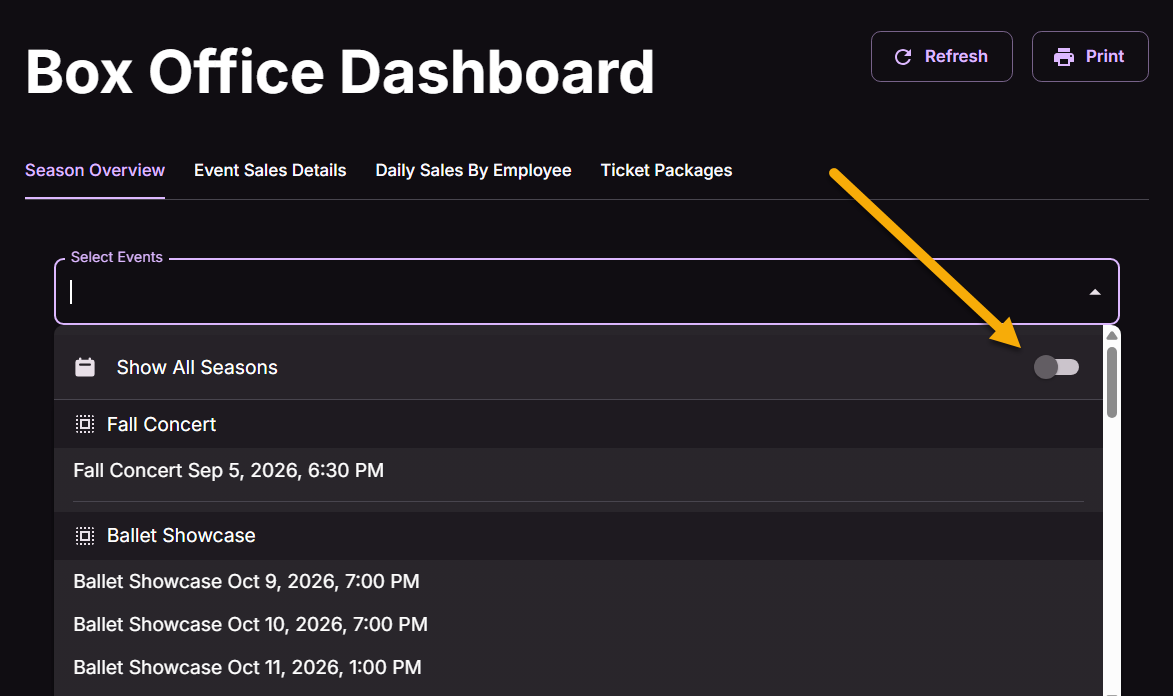
This is where Season Pattern Management stops being a settings page nobody thinks about and starts doing actual work. Over on the Box Office Dashboard, the Select Events dropdown now includes a “Show All Seasons” toggle right alongside your event list.
With defined seasons in place, your event selector can group and filter events by the season they fall into instead of just dumping every event into one long, undifferentiated scroll. Flip the toggle, and you step outside season boundaries entirely to see everything, regardless of which season it belongs to.
Where To Find It
Season settings live under Global Settings, on their own Season tab, ready whenever your organization’s year refuses to match everyone else’s.
Next Steps
Want to see how this fits into your workflow? Book a personalized demo and we’ll walk through it together.




