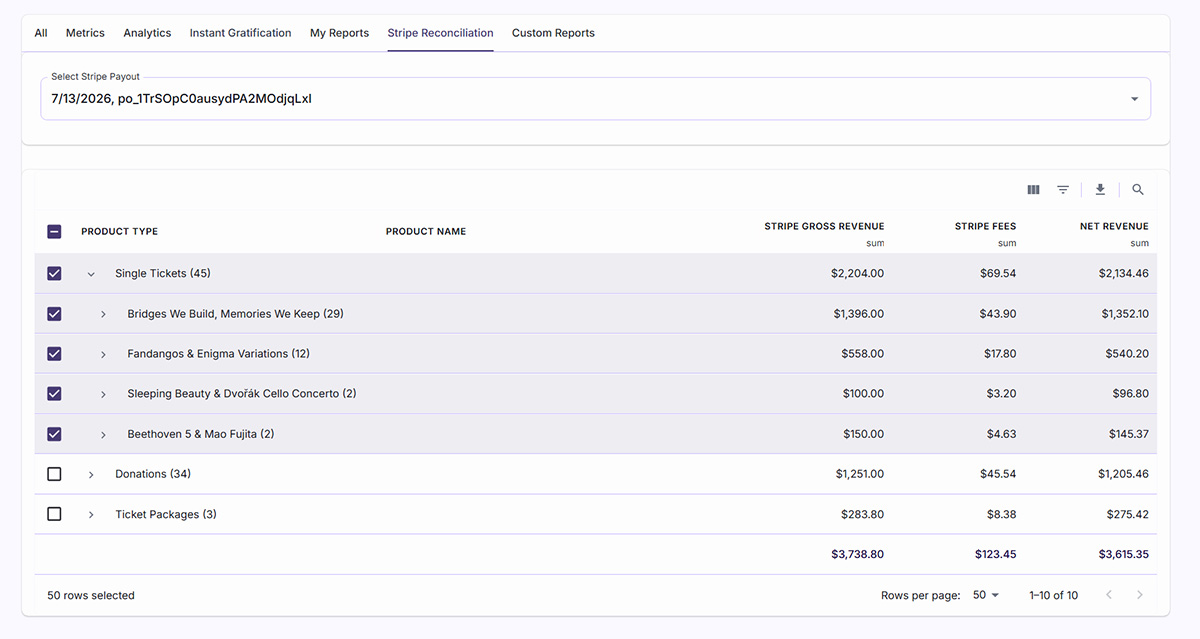
In the best scenario, your Ticketing CRM’s payment gateway, like Stripe, is in your organization’s name. If so, those payouts lands in your bank account as one number. One deposit, one date, one total. It doesn’t tell you how much came from ticket sales, how much came from donations, how much came from memberships, or how much Stripe kept in fees before it ever reached you. 💸
For most arts and culture organizations, piecing that picture together means opening two browser tabs: the Stripe dashboard in one, the CRM’s sales report in the other, and manually sorting transactions into categories your books actually use. It’s slow, it’s easy to get wrong, and it has to happen every time a payout lands.
Why the Payout Doesn’t Come Pre-Sorted
Standard Stripe payout data links back to charge IDs. Most ticketing CRMs, UpStage included, track orders by payment intent ID instead. Those two identifiers don’t automatically speak to each other, so out of the box, there’s no easy way to sort a payout by products. Layer on the fact that a single payout is a batch, sweeping together multiple days and every product type you sell into one settlement, and breaking it apart by hand stops being a quick check. It becomes an accounting project every time you run it.
What Well-Designed Reconciliation Reports Should Do
- Group revenue by product: Subscriptions, single tickets, donations, and memberships each get their own line, so the report already speaks the language your books use.
- Expand as far as your accounting needs: Roll everything up to a category total for a quick glance, or drill down to individual products and event occurrences when someone needs the detail.
- Break out fees and net, not just gross: Every category shows gross revenue, Stripe fees, and net revenue side by side, not a single lump sum you have to back into.
- Show your work with transaction counts: Product names carry transaction counts, and single tickets expand down to individual event occurrences, so a category totals and averages are never a mystery.
Why This Belongs on Your Evaluation Checklist
Too many Ticketing CRMs treat the payout as a black box or never show you the show you the payment gateway data. When you’re comparing platforms, ask a direct question: can this system break down a Stripe payout by what was actually sold, down to the fees and the net, without me rebuilding that picture by hand or sort out time zone differences?
That question is exactly what UpStage’s payout reconciliation report answers. It pulls Stripe’s payout data, matches every transaction back to its UpStage order, and organizes the results by product type, subscriptions, single tickets, donations, memberships, and credits, with expandable detail down to individual events and their fees. What used to take multiple windows and hours of time reconciling now lives in a single report that takes minutes to confirm.
What used to be an afternoon of tab switching and spreadsheet building is now the time it takes to make one selection.
Curious what your current CRM leaves you piecing together by hand? Book a demo and see how UpStage handles it.