


Every Tax Receipt, Finally In One Place
Canadian nonprofits have to issue a tax receipt with a unique, sequential ID for every eligible donation. Simple enough on paper. In practice, tracking down a specific receipt, confirming there are no gaps or duplicates in the ID sequence, or just answering “can you resend my tax letter” meant digging through records with no single view of what had actually been issued.
The new Tax Receipts dashboard fixes that. It’s a dedicated, searchable table of every donation transaction that generated a Tax ID, sitting in one place for admins and box office managers.
Where To Find It
Look for a new “Fundraising Dashboard” navigation item in the General group. The Tax Receipts table is the first thing under it, and it’s available in both the CRM and Boxoffice apps.
What’s In The Table
The dashboard is a paginated data grid showing 100 results per page by default, with a page size selector and forward and back navigation. Each row includes:
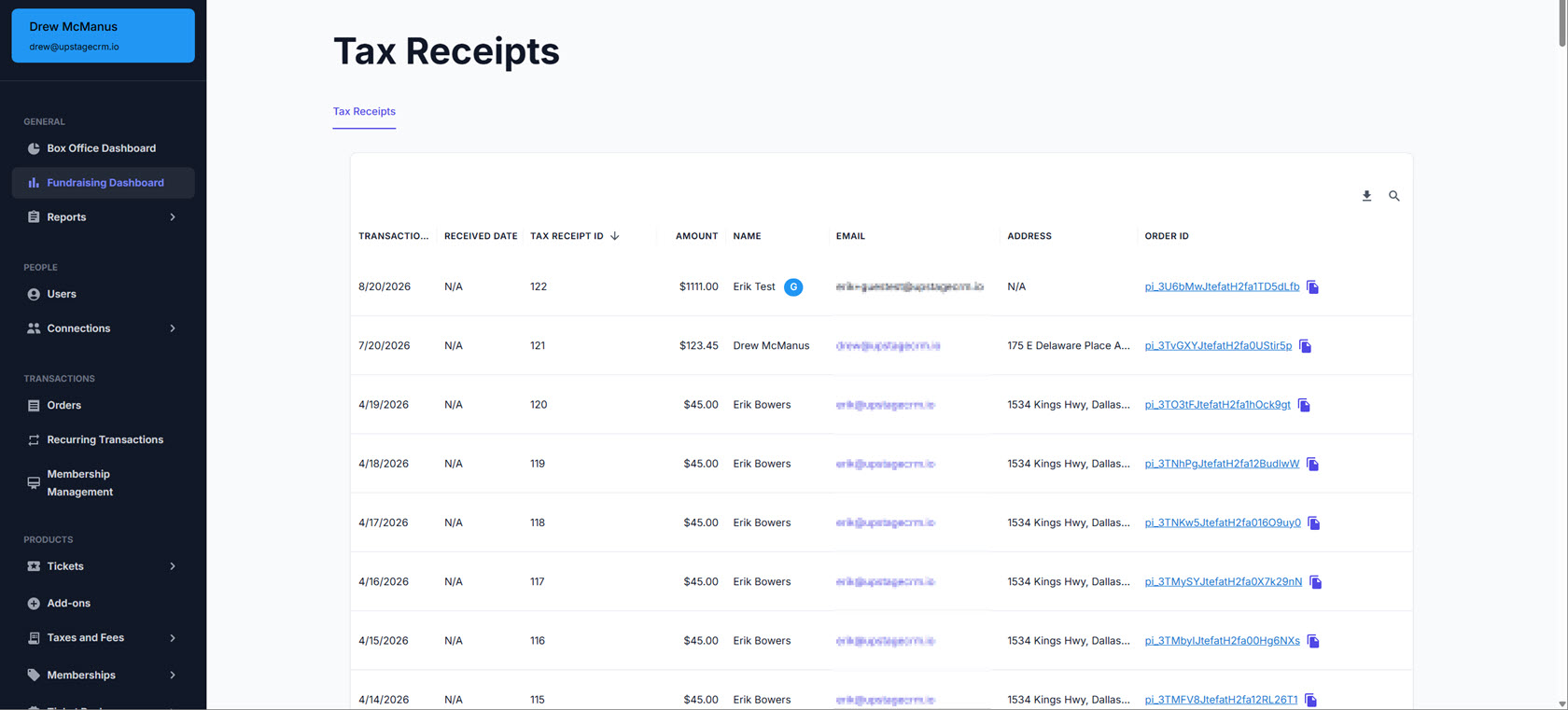
- Transaction date
- Received date
- Tax ID
- Amount
- Donor name
- Email address
- Full address
- Order ID
Email addresses link out to the donor’s user record so you can jump straight to their profile. Order IDs link to the corresponding order and include a copy-to-clipboard icon, so you’re not retyping order numbers into another system.
Guest Donations Are Fully Visible
In order to make the dashboard genuinely complete, tax receipts generated by guest checkouts, meaning donations made without a registered account, need to display the guest’s actual name and email address just like they do for registered users. Every receipt the system generates, registered donor or guest, now shows up in the table with real, usable donor information and the “guest” avatar next to guest uers.
Refunded Donations Still Show Their Receipts
If a donation is later refunded or cancelled, its tax receipt still appears in the dashboard. Tax ID sequences can’t have gaps, so the system keeps every issued receipt visible and leaves it to admins to track which transactions were later cancelled. Links directly to each transaction will confirm any cancelled donations.
Next Steps
Want to see how this fits into your Canadian donation workflow? Book a personalized demo and we’ll walk through it together.




