


Every CRM eventually runs into the same problem: three users, one first name, and a profile picture that’s just a circle with initials in it. Helpful, in the same way a parking permit is helpful. UpStage just fixed that.
What This Feature Does
Admins can now upload a real photo for any user, and it shows up everywhere it should. Staff in the CRM App and the Boxoffice App can see an actual headshot, which makes it faster to confirm you’re looking at the right person, especially in busy environments where “which Michael” is a legitimate daily question.
Uploading A Headshot
The upload process comes with a few built in guardrails, so nobody accidentally sets someone’s profile photo to a 4K vacation shot:
- Accepts PNG or JPG files, up to 250KB
- Requires a square image, minimum 120px by 120px
- Automatically crops photos that aren’t already square
Where The Photo Shows Up
Once uploaded, the headshot displays as a 120×120 circular avatar in three places:
- CRM App, User Details page
- CRM App, User Edit page
- Boxoffice App, User Profile card
That’s a meaningful jump from the old 48px version, which, generously, looked like a favicon.
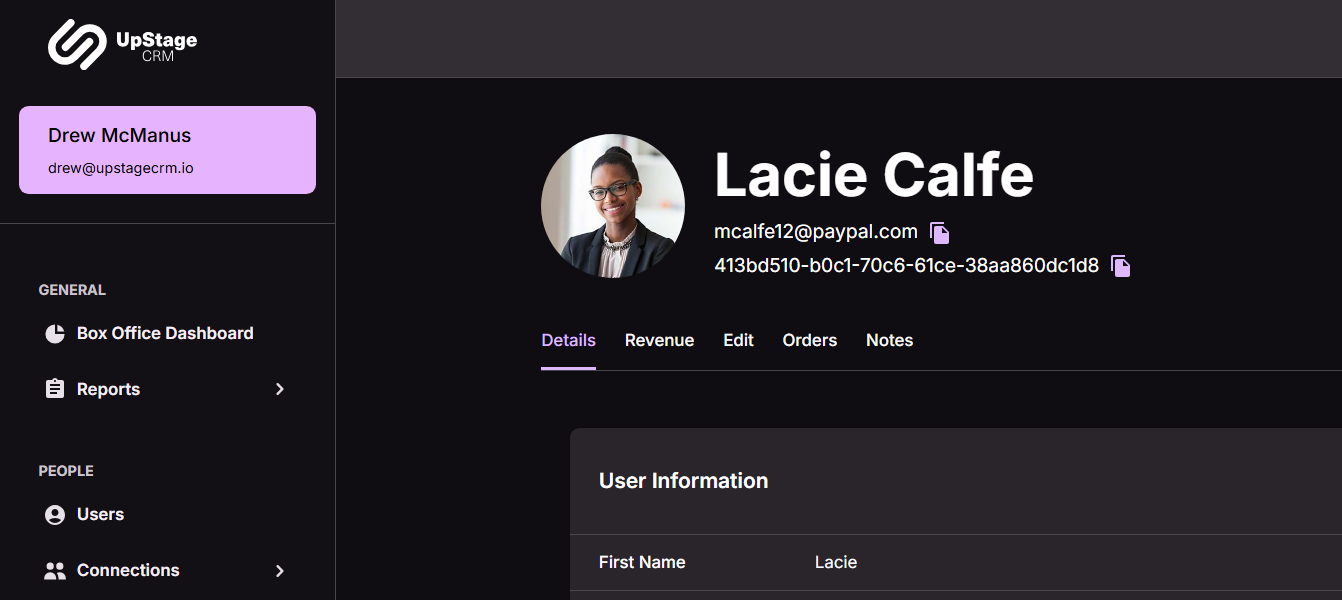
The Profile Card Also Got Tidier
Alongside the photo, the user card layout keeps things organized: the name sits next to the avatar, status flags like Deceased, Minor, or Do Not Contact stay top aligned in that same row so they’re impossible to miss, and both the email address and User ID get a one click copy icon.
No Photo Yet? No Problem
If a user doesn’t have a headshot uploaded, the profile falls back to a placeholder.
Next Steps
Want to see how this fits into your workflow? Book a personalized demo and we’ll walk through it together.




